2014-04-06

Oregon Scientific

I have now added support for the Oregon Scientific-range of sensors to OpenNetHome. As with the UPM-sensors there are two Home Items available to use them: OregonThermometer and OregonHygrometer. If the sensor model has a humidity sensor, you can connect both items to it. As usual they both support graphing of the values.
As usual I cannot test all variants. I have tested with the THGN132N which is a thermometer/humidity sensor. I have however added code for the THGR122NX, THGN123N, THGR810 and THGR810 temp/hum sensors, the THN132N, THR238NF and THWR800 temp only sensors, the WGR800 wind sensor, the RGR968 rain sensor and the BTHR968 temp/hum/pressure sensor. The support for those is a bit more theoretical, I have implemented it according to specifications, but have not tested them. Oregon Scientific also have three versions of the protocol: 1.0, 2.1 and 3.0. I have now implemented the 2.1 version. 3.0 would be possible to add, but again I don't have any sensors so, that would be a bit too theoretical implementation and I don't know how commonly used it is. Implementation is available in the nightly build.

2014-03-29

OpenNetHome in the media


I have now seen two articles about OpenNetHome online! One in the german Linux-Magazin and one in the greek site osarena.net. It is fun to see that the interest for home automation seems to be growing.

2014-03-24

Telldus


Since NetHome now officially support the Telldus Tellstick, the project now also has its own page on Telldus site for 3:rd party applications - check it out on here. Currently I am slowly moving documentation to the new site - a bit boring, but I guess it has to be done...

2014-03-20

NetHomeServer 2.0


I have now finally released NetHomeServer 2.0! Release notes are available here. The final struggle was to get the drivers for Tellstick to work on Windows 8, but with great help from Telldus support we got that working. They signed the VCP-drivers needed for NetHomeServer - thanks!

For those who have been using the nightly builds, there are no other new things in there, instead there are two other things that have changed: The first is that NetHomeServer is now also open source, distributed under GPL V3. It is available on GitHub. Previously I have opened my private repository for those who have wanted to contribute, but now I can just say: Clone us on GitHub!

The second thing is that NetHomeServer now has a new site. Since it is an open source project, I thought a .org-address would be more appropriate, so www.opennethome.org is the new home - please visit and have a look. The old wiki will still be there for a while, I have not moved everything over yet.

2014-02-24

New Items

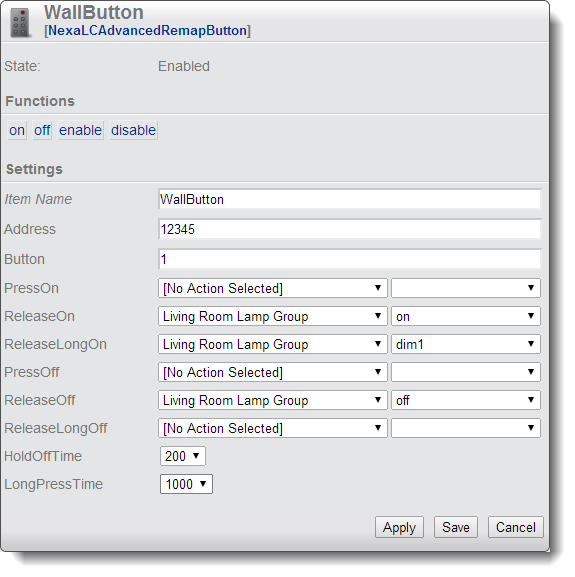
I have now completed two new HomeItems that are quite useful. The first is a more advanced version of the Remap button for the Nexa Learning Code-system. It allows you to map remote control and wall switch buttons to actions in NetHome. What is new is that you can map separate actions for when you press the button, release the button and release after having pressed for a longer time. Action on release is useful when you want the action to send commands using the same radio band as the button uses. The item is called NexaLCAdvancedRemapButton.

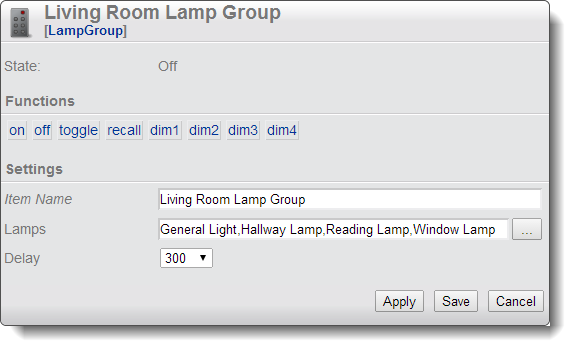
The other item is the LampGroup. In the lamp group you can specify a number of lamps which belong to the group, and via the group item you can treat them all as one lamp. The group has actions to turn on, off, toggle and also dim to four preset levels. Lamps that does not support dim will simply be turned on. When you call the off-action on the group, it will remember which lamps were actually on at that time and the recall-action turns those lamps on again. As usual you can mix any kind of lamps: Philips Hue, Nexa, FS20 and so on.

Both items are in the nightly build.

2014-02-10

Philips Hue

So, now I have added support for Philips Hue in NetHomeServer. It is one HomeItem for the bridge and one HomeItem per lamp. The new auto configure feature is also supported, so you only have to create the bridge item manually. After that all available lamps will automatically present themselves on the create screen, so you do not have to configure any parameters for them.
The really nice thing is that you can as usual mix them with any other of the supported systems. I control my hue lamps with a Nexa wall switch and a FS-20 wall switch. That way I can trigger different scenarios (colors and dim levels) from wall switches or other events (like timers, temperature and so on). Hue actually works particularly well with Nexa-switches since they use different RF-frequencies, so the signal from the switch does not interfere with the signals sent to control the lamps.
These are the first lamps with bi-directional communication that I have added support for, so if the lamps change state outside of NetHomeServer's control, this will still be reflected in the NetHomeServer GUI.
I am still trying to figure out the best way of specifying the color of the lamp in the Item, currently one integer is interpreted as color temperature, and two integers separated by a comma as hue and saturation.
The feature is available in the nightly build.

2014-01-04

Auto Configure

So, now I have finally completed a feature that I have wanted to add for a long time - automatically configured Home Items. This means that based on a received event, NetHomeServer can automatically configure a Home Item to respond to that event.
A typical use case is when you add a new lamp to your system. You would first program your lamp module to respond to the native remote control of the lamp module. When you press the remote control, this will show up as an event in NetHomeServer. If you select that event, you will be presented with a list of HomeItems that can respond to that event, typically a lamp-Item and a remap button Item. When you select the lamp Item, a new Home Item is created which is configured with the lamp's address so the only additional configuration needed is to give the lamp a meaningful name!
If you would install a new temperature sensor, this will automatically show up as a new event, and you can get a thermometer Home Item automatically configured to handle the new sensor. As usual, this feature works with all supported receivers: Tellstick Duo, Audio-input based and FS20 (FHZ 1000). This feature is now available in the nightly build.