2015-11-13

Save color

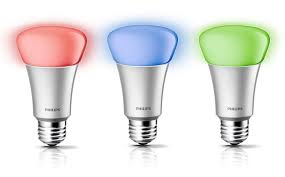
I have now added the possibility to save a color and dim setting as a preset dim value in the HueLamp-Item. You simply set the color and dim level via the Hue phone app for example, and then press the new "LearnDim1"-button in the Home Item. The current settings will then be stored in the Dim1 position and can later be recalled by selecting "Dim1". The HueLamp-Item has four Dim-positions where you can store color/dim-values.

I have also adapted the HueBridge-Item for the coming security changes in the Hue API. I must take the opportunity to thank the PhilipsHue developer support team for their excellent support! They have sent out mails and described the coming changes, but they have even looked in my source code and given detailed advice on how to adapt for the changes. Look at this support ticket to see what I mean. Really great developer support!

2015-11-05

Oregon Wind

I have now added a Home Item for Oregon Scientific's wind meters. The protocol decoders have had support for a while, but I do not have one myself, so I have not been able to do a proper Home Item. With help of some users who wanted the support I have now added the OregonWind-Item which can display the average wind, wind gusts and wind direction. It is in the nightly build.

2015-04-26

Belkin Wemo supported


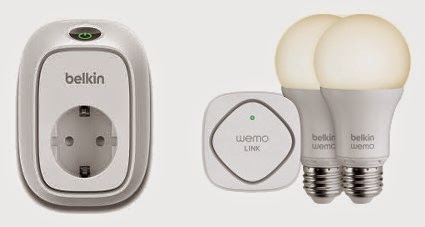
Support for Belkin Wemo is now added to OpenNetHome. The Wemo product line is a series of home automation devices which are controlled via WLAN. This means that you do not need any separate hardware in OpenNetHome to control them, they are controlled via the normal network. Normally you control the devices via a phone app, but now you can also control them via OpenNetHome. The devices that are currently supported are:

  • Wemo Switch - a remote switch
  • Wemo Insight Switch - a remote switch that also measures power consumption.
  • Wemo Smart LED Bulb (Including Wemo Link)
The power measurement values from the insight switch can be used in OpenNetHome for graphs and to trigger actions. 

All Items support auto creation, so when they are plugged in and connected to the network, OpenNetHome will automatically list them in the Item Creation page ready to be used. 
Since the LED Bulbs communicate via the Wemo Link (Bridge), you have to add the Wemo Bridge-Item before the LED Bulbs show up in the creation page.

The new functions are currently in the nightly build

2015-03-19

RollerTrol


I have now added support for the first actuator in OpenNetHome - the RollerTrol automation systems. RollerTrol manufactures motors for automating shades and blinds. Most of their products are very DIY-friendly, and one of their more popular products is a small tubular motor that fits in the IKEA Tupplur Blind.
RollerTrol uses remote controls on the 433MHz band, so they can be controlled with Tellstick, Bitbanger or home made RF-Transmitters from OpenNetHome.

The RollerTrolBlind-Item in OpenNetHome, can send the standard Up, Down and Stop commands, but also the configuration commands: Confirm, Limit and Reverse.
The Item presents the current position of the blind in real time, as percentage of the full travel. You can also define two custom stop positions where you can send the blind.
The Item is available in the nightly build.

2015-03-10

Hue Lux


I have added support for the monochrome lamps in the Philips Hue range called Hue Lux. These are a lower cost version of the lamps in the Hue series that does not support different colors, only dimming. I actually implemented this support without having access to a lamp myself, just using the excellent specs on Philips' site. With help from members on the forum I could get the feature verified and tested - thanks for the help! The lamps support auto detection like the ordinary Hue-lamps.
It is in the nightly build.

2014-12-14

Forum added

I thought I would make it easier to share answers to questions I get, and also have a place where other users can comment, so I have added a forum to to the site. I have been asked about this before and had actually prepared a forum plugin on the site for a while, but now I went for phpBB instead. The forum is available at http://forum.opennethome.org, welcome!

2014-12-07

Nethome is listening


It is now possible to send messages to Nethome and trigger actions and responses. In the new MessageInteractor-Item you can specify trigger strings, and if Nethome receives a chat message containing the trigger string the MessageInteractor-Item can trigger any action and also generate an answer which may contain attribute values from other Items.

In the example above, the trigger string of one Item is "whats" and the configured reply string is: "Nothing much... Outside temperature is ${Balcony.Temperature} degrees and the fridge is at ${Freezer.Temperature} degrees. The bedroom window lamp is ${Bedroomwindow.State}."

One advantage with using an xmpp chat client to access Nethome is that you do not have to open up your firewall to access it from the outside. The xmpp-client item can connect out through firewalls. In the XmppClient-item you can also specify from which senders you accept messages.

The MessageInteractor-item is available in the nightly build.