2015-04-26

Belkin Wemo supported


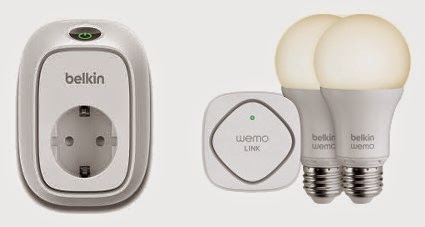
Support for Belkin Wemo is now added to OpenNetHome. The Wemo product line is a series of home automation devices which are controlled via WLAN. This means that you do not need any separate hardware in OpenNetHome to control them, they are controlled via the normal network. Normally you control the devices via a phone app, but now you can also control them via OpenNetHome. The devices that are currently supported are:

  • Wemo Switch - a remote switch
  • Wemo Insight Switch - a remote switch that also measures power consumption.
  • Wemo Smart LED Bulb (Including Wemo Link)
The power measurement values from the insight switch can be used in OpenNetHome for graphs and to trigger actions. 

All Items support auto creation, so when they are plugged in and connected to the network, OpenNetHome will automatically list them in the Item Creation page ready to be used. 
Since the LED Bulbs communicate via the Wemo Link (Bridge), you have to add the Wemo Bridge-Item before the LED Bulbs show up in the creation page.

The new functions are currently in the nightly build

2015-03-19

RollerTrol


I have now added support for the first actuator in OpenNetHome - the RollerTrol automation systems. RollerTrol manufactures motors for automating shades and blinds. Most of their products are very DIY-friendly, and one of their more popular products is a small tubular motor that fits in the IKEA Tupplur Blind.
RollerTrol uses remote controls on the 433MHz band, so they can be controlled with Tellstick, Bitbanger or home made RF-Transmitters from OpenNetHome.

The RollerTrolBlind-Item in OpenNetHome, can send the standard Up, Down and Stop commands, but also the configuration commands: Confirm, Limit and Reverse.
The Item presents the current position of the blind in real time, as percentage of the full travel. You can also define two custom stop positions where you can send the blind.
The Item is available in the nightly build.

2015-03-10

Hue Lux


I have added support for the monochrome lamps in the Philips Hue range called Hue Lux. These are a lower cost version of the lamps in the Hue series that does not support different colors, only dimming. I actually implemented this support without having access to a lamp myself, just using the excellent specs on Philips' site. With help from members on the forum I could get the feature verified and tested - thanks for the help! The lamps support auto detection like the ordinary Hue-lamps.
It is in the nightly build.

2014-12-14

Forum added

I thought I would make it easier to share answers to questions I get, and also have a place where other users can comment, so I have added a forum to to the site. I have been asked about this before and had actually prepared a forum plugin on the site for a while, but now I went for phpBB instead. The forum is available at http://forum.opennethome.org, welcome!

2014-12-07

Nethome is listening


It is now possible to send messages to Nethome and trigger actions and responses. In the new MessageInteractor-Item you can specify trigger strings, and if Nethome receives a chat message containing the trigger string the MessageInteractor-Item can trigger any action and also generate an answer which may contain attribute values from other Items.

In the example above, the trigger string of one Item is "whats" and the configured reply string is: "Nothing much... Outside temperature is ${Balcony.Temperature} degrees and the fridge is at ${Freezer.Temperature} degrees. The bedroom window lamp is ${Bedroomwindow.State}."

One advantage with using an xmpp chat client to access Nethome is that you do not have to open up your firewall to access it from the outside. The xmpp-client item can connect out through firewalls. In the XmppClient-item you can also specify from which senders you accept messages.

The MessageInteractor-item is available in the nightly build.

2014-11-09

Nethome Sending Messages

Nethome now have the ability to send messages! I have been wanting to add this for quite some time, but now it is done. I have been looking at a number of ways of communication, but I finally chose XMPP (Jabber). First I looked at ordinary mail, but messages from Nethome would typically be more of real time messages. Then I looked at SMS, but the problem is that you need to have payed accounts to have reliable service for that. XMPP is an instant messaging protocol, and there are a number of free XMPP (Jabber) servers available where you can get an account. There are also a number of clients for IPhone and Android. Messages pop up in your phone just like SMS (provided that you have internet connection).

There are two new Items added for this: XmppClient, which has the configuration for the connection to the server and Message which holds a message and has the send-action.

The message text may refer to attribute values of other Home Items, so the text in the picture above is really: "Freezer is too warm, currently at ${Freezer.Temperature} degrees"

I am using the excellent Babbler-library by Christian Schudt for the xmpp-communication.

So all you need to do is to create one account for your Nethome-server and one account for yourself at one of the jabber servers and then your nethome server can start sending messages to you.

2014-09-27

Give your home a REST

OpenNetHome have always had a TCP/IP interface for integration in the TCPCommandPort-Item. But it is time to add a more modern interface to my home. I have now implemented a REST-interface with json encoding to OpenNetHome which exposes HomeItems as REST-resources. Since basically everything in OpenNetHome is HomeItems (lamps, thermometers, timers, web-server and so on) this means that most of the features in the server can be reached via this interface. The URL to turn off the lamp in my bedroom window is for example:

POST http://ssgserver2:8020/rest/items/108/actions/off/invoke

and to get the temperature on the balcony i do a get on the URL:

GET http://ssgserver2:8020/rest/items/52

The "108" and "52" are the identities of the corresponding HomeItems, and you can get the identities by listing all HomeItems in the server with:

GET http://ssgserver2:8020/rest/items

This kind of interface works well with modern WEB-frameworks like ember.js and AngularJS but also for integration with phone apps and other home control systems.

The full documentation of the interface is available here on the OpenNethome-site. The implementation is as usual available in the nightly build. Note that details of the interface my still change and feedback on the interface is welcome!