2023-01-07
Maintenance
The development activity has been low on this project lately, but I get reports that the servers keep running out there... The web sites however were in kind of a bade state due to missing upgrades. This has been fixed now, so http://opennethome.org/, http://wiki.nethome.nu and http://forum.opennethome.org are up and running again!


2018-03-25
More MQTT
I have been receiving feedback and requests for more MQTT-Support in OpenNetHome. After some discussions and feedback rounds I have ended up with two new Items:
MqttCommander
This is item has four command-actions and when an action is triggered a corresponding MQTT-Message is sent to a configured topic.
MqttLamp
The MqttLamp behaves like a standard lamp, and controls a lamp/switch via MQTT. You configure the topic of the device you want to control and the messages used to turn the device on or off. The MqttLamp will also listen on that topic for those messages to update the state if it is changed from another source.
These Items makes it possible to include devices controlled via MQTT as Home Items.
As usual, the Items are available in the nightly build
MqttCommander
This is item has four command-actions and when an action is triggered a corresponding MQTT-Message is sent to a configured topic.
MqttLamp
The MqttLamp behaves like a standard lamp, and controls a lamp/switch via MQTT. You configure the topic of the device you want to control and the messages used to turn the device on or off. The MqttLamp will also listen on that topic for those messages to update the state if it is changed from another source.
These Items makes it possible to include devices controlled via MQTT as Home Items.
As usual, the Items are available in the nightly build
2017-11-09
IKEA Increases security
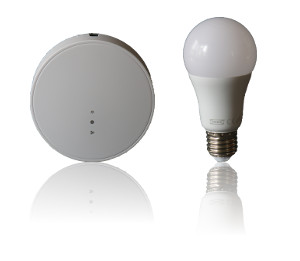
Unfortunately this change is not backwards compatible, so as soon as you do a firmware upgrade of your gateway, the old IkeaGateway-Item in OpenNetHome stops working.
I have now implemented the needed changes in the IkeaGateway-Item, and it is available in the nightly build. When you upgrade, the IkeaGateway-Item will automatically request the client security key from the gateway. According to IKEA's recommendations the IkeaGateway-Item no longer stores the original security code once the client code is generated.
The new ClientName attribute does not normally have to be changed from the default value when you create a new IkeaGateway-Item, but if you have multiple Items connecting to the same gateway, each Item must have a different ClientName.
I think it is good that IKEA takes IoT-security seriously and works actively to increase it in their solutions.
2017-07-31
NetHomeServer 3.0
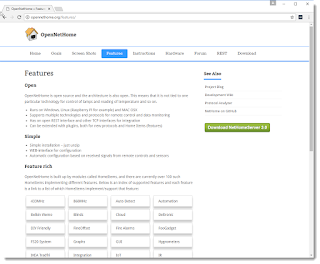
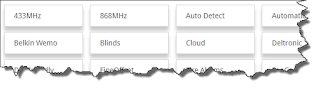
A new part of the WEB-Site is the Feature Index. This is a way to try to visualize all the features that are available in OpenNetHome, and to guide you to the proper HomeItems to use that feature. Welcome in to browse around the features!
2017-07-21
Customizing Plan View

I have been a bit reluctant to add this, because it is a bit of work and other features has always felt more important. Now I got requests to customize other aspects of the plan view as well, and then I realized that the easiest way to be able to customize anything is to allow a custom css file to be added. This is now added in the nightly build.
So, to change the Icon for a specific Item to a coffee maker, you first upload the image file (coffee32.png) to the media library (in settings). Then you find out the ID of the Item by looking at the Item details page (Id is 44 in this example) and make a small css-file that looks like this:
#ID44 li.icon.lamp_off {
background: url(coffee32.png) no-repeat center;
}
#ID44 li.icon.lamp_on {
background: url(coffee32.png) no-repeat center;
}
You upload the .css file in the media library, go to the plan page, click "edit this page" and select the css-file.
This is just one example a what can be changed this way.
2017-07-19
Custom Lamp
I have got some vacation hacking time, so I have also added an other HomeItem on a user request. A number of users use OpenNetHome partly as a GUI front end for their own implemented hardware, which is exactly what one of the goals with the project is. In this case the user had connected a number of relays which are controlled via shell scripts, and wanted them to be presented as Lamps in the GUI.
I added the CustomLamp-Item, which behaves like a lamp, but you can configure the on- and off-actions in the Item. Those actions can be to call actions in other Items or as in this case to call external shell scripts.
The CustomLamp-Item is in the nightly build
I added the CustomLamp-Item, which behaves like a lamp, but you can configure the on- and off-actions in the Item. Those actions can be to call actions in other Items or as in this case to call external shell scripts.
The CustomLamp-Item is in the nightly build
Prologue Thermometer

Unfortunately, Telldus has not (yet) added support for it in the TellstickDuo firmware, so it can not be used if you are using TellstickDuo as RF receiver.
2017-06-05
Warm Dim
In the IkeaColorTemperatureLamp, the Item for controlling IKEA Trådfri's white spectrum lamps the new feature WarmDim is now added. When WarmDim is activated, the color temperature is automatically turned warmer the more dimmed the light is, to emulate the way normal incandescent bulbs turns orange when dimmed low. This makes the dimming look more natural.
You can still set a color temperature for the lamp, which will be used when the lamp is at full power, but the more it is dimmed the warmer the light will get, starting from the set value.
The feature is in the nightly build.
You can still set a color temperature for the lamp, which will be used when the lamp is at full power, but the more it is dimmed the warmer the light will get, starting from the set value.
The feature is in the nightly build.
2017-05-21
Instruction film for IKEA
I have now made a short instruction film for how to configure and control IKEA Trådfri lamps in OpenNetHome. It is available on YouTube on the OpenNetHome.org-channel.
I tried to get approval from IKEA to use the sound track from their instruction films, as it felt more "genuine", but IKEA did not allow it :-(. Maybe just as well, this track is a lot less annoying then theirs...
I tried to get approval from IKEA to use the sound track from their instruction films, as it felt more "genuine", but IKEA did not allow it :-(. Maybe just as well, this track is a lot less annoying then theirs...
2017-05-07
Support for IKEA Trådfri

IKEA has made a slightly unexpected entry in the Home Automation space with the new product line Trådfri. Currently it includes a variety of different remote controlled LED-bulbs and some interesting LED-surfaces. They can be controlled via a set of different remote controls or via an app (requires a gateway). All of them are very aggressively priced and best of all, the LED-bulbs are very powerful, with a max of 1000lm which is like a 75W incandescent bulb!
I have now added support for controlling the IKEA lamps with OpenNetHome. It requires the Trådfri Gateway to work (as the app do), but no other hardware.
The IkeaGateway-Item supports auto create, so when the gateway is connected in your local network, it shows up in the create-page as a detected device. When you create the IkeaGateway-Item, you have to enter the security code that is printed on the bottom of the Gateway.
Once the Gateway Item is created, all connected lamps will be auto detected and also show up as detected devices.
There are two lamp types supported, IkeaLamp and IkeaColorTemperatureLamp. The IkeaLamp represents the standard dimmable lamp with fixed color temperature where the brightness can be set between 0 and 100%. The IkeaColorTemperatureLamp represents the lamps with variable color temperature and for them the color temperature can be set between 0 and 100%, where 0 represents the coldest light. They both support the standard features with four configurable preset dim levels,
All Items are available in the Nightly build.
2016-08-17
MQTT
I have received a new great contribution to the project - MQTT-support! MQTT is a standard for sending and receiving small messages, or events via an MQTT server. It is being used more and more for IoT (Internet of Things), to send messages from small devices like sensors or thermometers.
Support for MQTT is something that has been asked for by other users, but I have not had the time to learn about it and build the support. Now this contribution solves the problem!
The contribution consists of four new HomeItems:
MqttClient
This is the item which actually listens to MQTT. Here you can specify the address to your MQTT broker, and the topic on which OpenNetHome subscribes.
MqttHygrometer
A moisture sensor, listening on a specific MQTT topic.
MqttThermometer
A temperaturesensor, listening on a specific MQTT topic.
MqttRemapButton
Listens to a specific topic, and can execute six different actions depending on the message received.
These functions are contributed by Jocke G and Patrik Gustavsson - thanks a lot guys!
The Items are in the nightly build.
Support for MQTT is something that has been asked for by other users, but I have not had the time to learn about it and build the support. Now this contribution solves the problem!
The contribution consists of four new HomeItems:
MqttClient
This is the item which actually listens to MQTT. Here you can specify the address to your MQTT broker, and the topic on which OpenNetHome subscribes.
MqttHygrometer
A moisture sensor, listening on a specific MQTT topic.
MqttThermometer
A temperaturesensor, listening on a specific MQTT topic.
MqttRemapButton
Listens to a specific topic, and can execute six different actions depending on the message received.
These functions are contributed by Jocke G and Patrik Gustavsson - thanks a lot guys!
The Items are in the nightly build.
2016-03-25
JeeLink

The best radio interface available for controlling 433MHz devices is in my opinion the Tellstick Duo. Unfortunately this device is not sold in the US/Canada. So to have something that is possible to use there, I have added support for the JeeLink classic. JeeLink is an Arduino compatible programmable radio transmitter/receiver sold by JeeLabs/Digital Smarties. I have developed a small firmware for JeeLink that allows it to act as a generic 433MHz transmitter for OpenNetHome. It does unfortunately not support reception, but on the other hand it is quite inexpensive (€32.50).
To use it, you have to install the OpenNetHome firmware on it, see this page for more instructions. Support is implemented in the nightly build.
2016-02-28
Logging to database
In OpenNethome Items like thermometers can log the values to file, so they can be presented as graphs. The values are stored in flat text files which get quite big after a while, and then the graphs gets slower to present.
Now we have got a great contribution from Peter Lagerhem; He has implemented a database home item (H2DatabaseTCPServer) and the ability to log to the database and generate the graphs from there. Since the database is much more efficient in finding values for a time period, the graphs are generated much faster. It is also easier to access the values from other programs.
The database file can be specified in two ways: either for each Item as you do for log files or one central database file which then is automatically used by all Items that log values. The central database file is configured on the settings page in the GlobalLogger field:
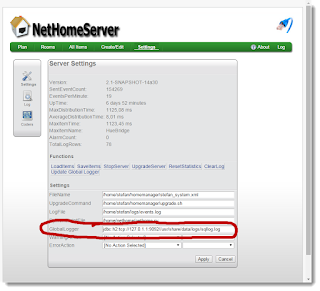
To specify A database log, the log name has the format:
jdbc:h2:tcp://127.0.1.1:9092//usr/share/data/logs/sqllog.log
Where /usr/share/data/logs/sqllog.log in this case is the name of the actual file and jdbc:h2:tcp://127.0.1.1:9092/ is the database connection address which you can see on the H2DatabaseTCPServer-Item.
When specify the database file name as logger, the database with data model is automatically created. You also have to create a H2DatabaseTCPServer-Item which implements the database server.
Peter also included a feature to migrate all existing log data from the text files into the database and this is done with the "UpdateGlobalLogger"-button. Note that if you have a lot of logged data this migration can take a couple of minutes.
The changes are in the nightly build - thanks Peter!
Now we have got a great contribution from Peter Lagerhem; He has implemented a database home item (H2DatabaseTCPServer) and the ability to log to the database and generate the graphs from there. Since the database is much more efficient in finding values for a time period, the graphs are generated much faster. It is also easier to access the values from other programs.
The database file can be specified in two ways: either for each Item as you do for log files or one central database file which then is automatically used by all Items that log values. The central database file is configured on the settings page in the GlobalLogger field:

To specify A database log, the log name has the format:
jdbc:h2:tcp://127.0.1.1:9092//usr/share/data/logs/sqllog.log
Where /usr/share/data/logs/sqllog.log in this case is the name of the actual file and jdbc:h2:tcp://127.0.1.1:9092/ is the database connection address which you can see on the H2DatabaseTCPServer-Item.
When specify the database file name as logger, the database with data model is automatically created. You also have to create a H2DatabaseTCPServer-Item which implements the database server.
Peter also included a feature to migrate all existing log data from the text files into the database and this is done with the "UpdateGlobalLogger"-button. Note that if you have a lot of logged data this migration can take a couple of minutes.
The changes are in the nightly build - thanks Peter!
2016-01-31
Background Images

In the plan view, it is possible to add your own background image. Up until now that has been a bit messy to do that, since you have had to manually put the background image file in the correct media directory of the OpenNetHome-server and then edit the Plan item to set it.
Now I have added a media image view under settings, where it is easy to upload new background images from the GUI. When you set the Plan-view in edit mode you can select any of the uploaded files from a drop down menu.
The changes are in the nightly build.
2016-01-16
The power of open source
I have been a bit lazy with blogging lately, but I will try to make it up...
During the last month, the project has received two contributions of new functions to the server!
During the last month, the project has received two contributions of new functions to the server!
- Jari Särkkä has added an integration with Python script language, so it is possible to write actions and functions in Python for HomeItems
- Peter Lagerhem has added functions to write log data from HomeItems to an SQL-database instead of text files which speeds up the graphs and makes it easier to process and access log data from other programs.
I will be writing more about both contributions in blogs to come when I have added some more documentation, but this is a real proof of the benefits of open source, when people can share their efforts and features. Thanks a lot both of you!
2015-11-13
Save color
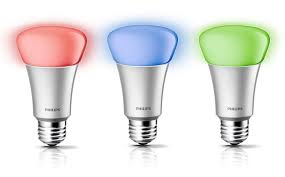
I have also adapted the HueBridge-Item for the coming security changes in the Hue API. I must take the opportunity to thank the PhilipsHue developer support team for their excellent support! They have sent out mails and described the coming changes, but they have even looked in my source code and given detailed advice on how to adapt for the changes. Look at this support ticket to see what I mean. Really great developer support!
2015-11-05
Oregon Wind

2015-04-26
Belkin Wemo supported
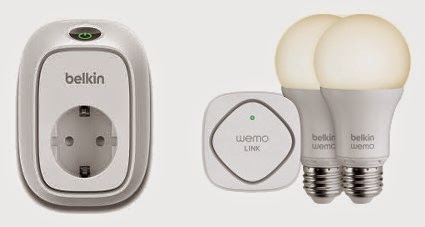
- Wemo Switch - a remote switch
- Wemo Insight Switch - a remote switch that also measures power consumption.
- Wemo Smart LED Bulb (Including Wemo Link)
The power measurement values from the insight switch can be used in OpenNetHome for graphs and to trigger actions.
All Items support auto creation, so when they are plugged in and connected to the network, OpenNetHome will automatically list them in the Item Creation page ready to be used.
Since the LED Bulbs communicate via the Wemo Link (Bridge), you have to add the Wemo Bridge-Item before the LED Bulbs show up in the creation page.
The new functions are currently in the nightly build
2015-03-19
RollerTrol

I have now added support for the first actuator in OpenNetHome - the RollerTrol automation systems. RollerTrol manufactures motors for automating shades and blinds. Most of their products are very DIY-friendly, and one of their more popular products is a small tubular motor that fits in the IKEA Tupplur Blind.
RollerTrol uses remote controls on the 433MHz band, so they can be controlled with Tellstick, Bitbanger or home made RF-Transmitters from OpenNetHome.
The RollerTrolBlind-Item in OpenNetHome, can send the standard Up, Down and Stop commands, but also the configuration commands: Confirm, Limit and Reverse.
The Item presents the current position of the blind in real time, as percentage of the full travel. You can also define two custom stop positions where you can send the blind.
The Item is available in the nightly build.
2015-03-10
Hue Lux

I have added support for the monochrome lamps in the Philips Hue range called Hue Lux. These are a lower cost version of the lamps in the Hue series that does not support different colors, only dimming. I actually implemented this support without having access to a lamp myself, just using the excellent specs on Philips' site. With help from members on the forum I could get the feature verified and tested - thanks for the help! The lamps support auto detection like the ordinary Hue-lamps.
It is in the nightly build.
Subscribe to:
Posts (Atom)