2014-02-24

New Items

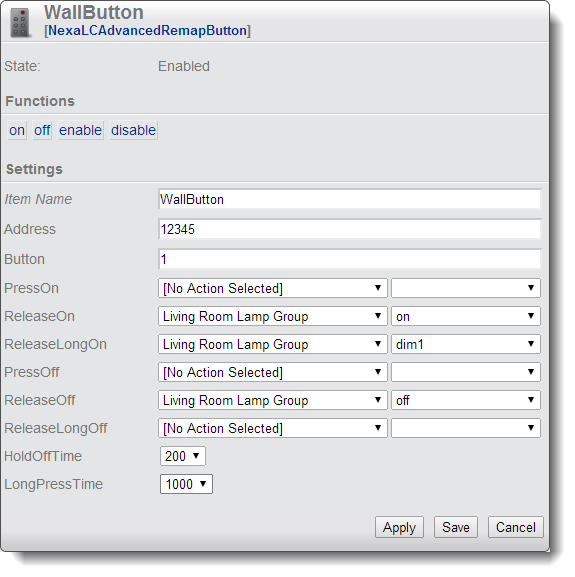
I have now completed two new HomeItems that are quite useful. The first is a more advanced version of the Remap button for the Nexa Learning Code-system. It allows you to map remote control and wall switch buttons to actions in NetHome. What is new is that you can map separate actions for when you press the button, release the button and release after having pressed for a longer time. Action on release is useful when you want the action to send commands using the same radio band as the button uses. The item is called NexaLCAdvancedRemapButton.

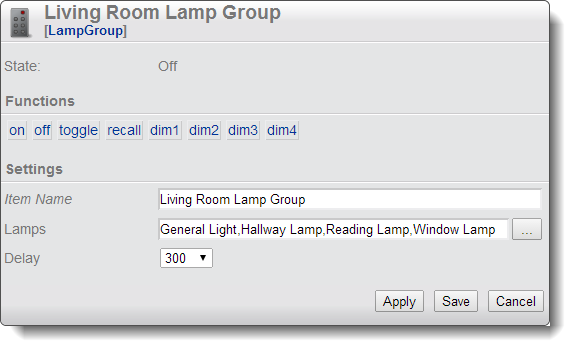
The other item is the LampGroup. In the lamp group you can specify a number of lamps which belong to the group, and via the group item you can treat them all as one lamp. The group has actions to turn on, off, toggle and also dim to four preset levels. Lamps that does not support dim will simply be turned on. When you call the off-action on the group, it will remember which lamps were actually on at that time and the recall-action turns those lamps on again. As usual you can mix any kind of lamps: Philips Hue, Nexa, FS20 and so on.

Both items are in the nightly build.

2014-02-10

Philips Hue

So, now I have added support for Philips Hue in NetHomeServer. It is one HomeItem for the bridge and one HomeItem per lamp. The new auto configure feature is also supported, so you only have to create the bridge item manually. After that all available lamps will automatically present themselves on the create screen, so you do not have to configure any parameters for them.
The really nice thing is that you can as usual mix them with any other of the supported systems. I control my hue lamps with a Nexa wall switch and a FS-20 wall switch. That way I can trigger different scenarios (colors and dim levels) from wall switches or other events (like timers, temperature and so on). Hue actually works particularly well with Nexa-switches since they use different RF-frequencies, so the signal from the switch does not interfere with the signals sent to control the lamps.
These are the first lamps with bi-directional communication that I have added support for, so if the lamps change state outside of NetHomeServer's control, this will still be reflected in the NetHomeServer GUI.
I am still trying to figure out the best way of specifying the color of the lamp in the Item, currently one integer is interpreted as color temperature, and two integers separated by a comma as hue and saturation.
The feature is available in the nightly build.
2014-01-04

Auto Configure

So, now I have finally completed a feature that I have wanted to add for a long time - automatically configured Home Items. This means that based on a received event, NetHomeServer can automatically configure a Home Item to respond to that event.
A typical use case is when you add a new lamp to your system. You would first program your lamp module to respond to the native remote control of the lamp module. When you press the remote control, this will show up as an event in NetHomeServer. If you select that event, you will be presented with a list of HomeItems that can respond to that event, typically a lamp-Item and a remap button Item. When you select the lamp Item, a new Home Item is created which is configured with the lamp's address so the only additional configuration needed is to give the lamp a meaningful name!
If you would install a new temperature sensor, this will automatically show up as a new event, and you can get a thermometer Home Item automatically configured to handle the new sensor. As usual, this feature works with all supported receivers: Tellstick Duo, Audio-input based and FS20 (FHZ 1000). This feature is now available in the nightly build.

2013-12-17

Bad Zip

I have been contacted by several users who have had problems unzipping the nightly build. I seems that my ISP have some kind of problems with their FTP-server, so the upload fails and leaves the file corrupted on the site. I have now switched off automatic build and I will upload manually as soon as I make any changes, so I can check the file afterwards. The current file is now ok.

2013-11-24

New Icons

So, as part for preparations to make NetHomeServer open source, I have now replaced all commercial icons with open source icons from the "Tango Desktop Project". The downside is of course that the icons look a bit less "professional", some of them I had to draw (or modify) myself. The good part is that I have the vector image source for all of them so it is possible to improve them in a controlled manner. So this is the new look of NetHome.

2013-11-03

Protocol Analyzer 2.0


Protocol Analyzer 2.0 is now released. It can be downloaded from http://wiki.nethome.nu/doku.php/analyzer/start. The analyzer now supports decoder plugins. This means that it is easy to write your own decoder for a new protocol and plug it in to the Protocol Analyzer. The same decoder plugin can also be used in the NethomeServer.

The Protocol Analyzer now also has a real installer both for windows and for other platforms.

More details about the changes can be seen in the release notes.

2013-11-01

Open Source


I have now finally started publishing the NetHome stuff as open source on GitHub. I have started with the Protocol Analyzer tool, and published the source for that. Unfortunately this is the oldest Java code I have written, so it is not the most beautiful...
The biggest blocker was actually the Icons. A long time ago I got tired of spending time finding nice icons for my projects, so I bought a commercial library (http://www.iconexperience.com) which is really good - but... I have tried to contact them on how to handle the icons in open source projects and never got any answer. So in the end I have had to spend the time replacing all icons in the program with public domain icons, which really felt like a big waste of time.
This is now done and I am preparing for releasing version 2.0 of the Protocol Analyzer with some really nice new features.